

Module 1: Hello, agent! Run locally
📖 Reading this in VS Code? The language tabs only render on the web. Open the rendered version ↗
Duration: ~30 minutes
What you’ll learn
- How to write a minimal Strands agent
- What the
BedrockAgentCoreAppwrapper does and why it matters - How to run an agent on your own machine and call it over HTTP
- The request contract (
/invocationsand/ping) that AgentCore expects
Why start local?
In the next module you’ll deploy an agent to AWS. Deploying something you’ve never seen run is a bad time: when it breaks, you can’t tell whether the bug is in your code or your infrastructure.
So we start small. Here you write an agent and run it on your laptop. No Pulumi, no AWS resources, nothing to tear down. Once you’ve watched it answer a question locally, Module 2 is just “ship this exact file to the cloud.”
Key concept: the agent is an HTTP service
A Strands agent is plain Python. To run it on AgentCore, you wrap it with
BedrockAgentCoreApp, which turns your agent into a small HTTP service with two
routes:
POST /invocations- run the agent on a request payloadGET /ping- a health check AgentCore uses to know your agent is alive
The important part: this is the same wrapper locally and in the cloud. Run the file
on your laptop and it serves those two routes on localhost:8080. When AgentCore
runs it later, it calls the same routes. Your agent code doesn’t change between
“local” and “deployed” - only where it runs does.
Step 1: Create the agent
Make a working directory and an agent file:
mkdir 01-hello-agent && cd 01-hello-agent
Create a basic_agent.py file in your IDE and copy the content in:
"""A minimal Strands agent wrapped for Amazon Bedrock AgentCore.

Run it locally:

    python basic_agent.py

It starts an HTTP server on http://localhost:8080 with two routes that
AgentCore also calls in the cloud:

    POST /invocations   -> run the agent on a {"prompt": "..."} payload
    GET  /ping          -> health check

This is the *same* file you deploy in Module 2 - running it locally first
means "deploy" later is just shipping something you've already seen work.
"""

from strands import Agent
from bedrock_agentcore.runtime import BedrockAgentCoreApp

app = BedrockAgentCoreApp()

# Pin the model so every learner gets the same behavior and cost. Without an
# explicit model, Strands falls back to a default that changes between releases.
MODEL_ID = "us.anthropic.claude-haiku-4-5-20251001-v1:0"


def create_basic_agent() -> Agent:
    """Create a basic agent with a simple system prompt."""
    system_prompt = "You are a helpful assistant. Answer questions clearly and concisely."
    return Agent(model=MODEL_ID, system_prompt=system_prompt, name="BasicAgent")


@app.entrypoint
async def invoke(payload=None):
    """Entrypoint AgentCore calls for every invocation."""
    try:
        query = (
            payload.get("prompt", "Hello, how are you?")
            if payload
            else "Hello, how are you?"
        )

        agent = create_basic_agent()
        response = agent(query)

        return {"status": "success", "response": response.message["content"][0]["text"]}

    except Exception as e:
        return {"status": "error", "error": str(e)}


if __name__ == "__main__":
    app.run()
Four things to notice:
BedrockAgentCoreApp()is the wrapper that exposes/invocationsand/ping.MODEL_IDpins the exact Bedrock model (Claude Haiku 4.5 through theus.cross-region inference profile - fast and cheap). Leave themodelargument off and Strands picks a default that changes between SDK releases: fine for a quick demo, surprising when a rebuild suddenly answers with a different model.@app.entrypointmarks the function that runs on each request. The payload is a dict - here we read a"prompt"key.app.run()starts the local HTTP server when you run the file directly.
Step 2: Install dependencies
Create a requirements.txt file in your IDE and copy the content in:
strands-agents~=1.42.0
bedrock-agentcore~=1.14.0
boto3
The two SDKs are pinned (~= allows patch updates only) so everyone in the room,
and every container build in later modules, resolves the same versions.
Install them (a virtual environment keeps things tidy):
python -m venv .venv && source .venv/bin/activate
pip install -r requirements.txt
Step 3: Run the agent
The agent needs AWS credentials to call Bedrock. Inject them from your ESC environment so you don’t have to export anything by hand:
pulumi env run aws-bedrock-workshop/dev -- python basic_agent.py
You should see the server start up and begin listening on http://localhost:8080.
Leave it running. The terminal will look idle. That’s the server waiting for
requests, not a hang.
In GitHub Codespaces you’ll also get a popup saying port 8080 is available:
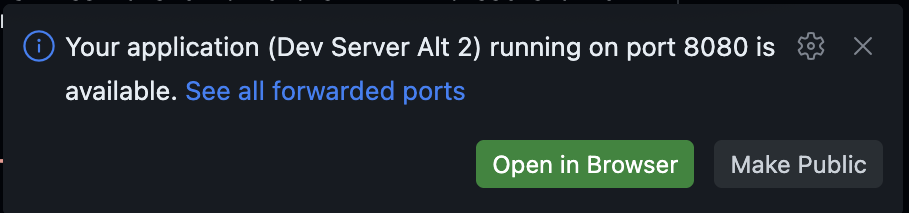
Click Make Public on that popup. Don’t bother opening it in a browser, though.
The agent only answers on POST /invocations and GET /ping, so the root URL shows
nothing. You’ll call it from a second terminal in the next step.
Step 4: Call it
Open a second terminal and send the agent a prompt. Piping through jq keeps the
JSON readable instead of one long line (it’s pre-installed in Codespaces; locally,
drop the | jq if you don’t have it):
curl -s -X POST http://localhost:8080/invocations \
  -H 'Content-Type: application/json' \
  -d '{"prompt": "What is Amazon Bedrock AgentCore?"}' | jq
You’ll get back a JSON object like:
{
  "status": "success",
  "response": "Amazon Bedrock AgentCore is ..."
}
That answer came from a real Bedrock model, called by your agent, on your own machine.
Check the health endpoint too - it’s the same one AgentCore polls:
curl -s http://localhost:8080/ping | jq
When you’re done, stop the server with Ctrl+C in the first terminal.
Try it yourself
- Change the personality. Edit
system_promptto make the agent a pirate, a haiku poet, or a terse senior engineer. Restart and curl it again. - Send different prompts. Swap the
"prompt"value in the curl command. - Break it on purpose. Stop the server and curl
/invocationsagain - watch the connection refuse. Worth seeing now: when a deployed agent goes unreachable later, it usually means the runtime isn’t healthy.
What you learned
- A Strands agent is ordinary Python;
BedrockAgentCoreAppwraps it as an HTTP service - That service exposes
POST /invocationsandGET /ping- locally and in the cloud - You ran an agent end to end without provisioning a single AWS resource
- Even a “local” agent calls Bedrock, so it needs AWS credentials (provided via ESC)
Next up: Module 2: Your first agent on AgentCore. You’ll
take this exact basic_agent.py and deploy it.